


Product · Diagnostics
Test your website from inside the China firewall.
A China firewall test run from 140+ real Mainland China nodes — HTTP, ping, and DNS checks plus a full-page browser fetch — live in the Client Workbench for entitled organizations.
Product demo
Watch Network Diagnostics in the Client Workbench.
A short walkthrough of HTTP, PING, and DNS checks from Mainland China vantage points.
Capabilities
Four checks, one China-side vantage point.
Every check executes inside Mainland China — not simulated, not proxied through Hong Kong.
-
HTTP response
Status codes, timing, and reachability of your URLs from Mainland China nodes.
-
Ping latency
Round-trip time and packet-loss patterns from China-side vantage points.
-
DNS resolution
How China resolvers answer for your domains, and how long they take.
-
Full page fetch
A real browser inside Mainland China loads your page end to end — document phases, every element request, and pass/fail assertions on top.
-
China-wide probe coverage
The URL probe runs from 140+ nodes across Mainland China — Telecom, Mobile, and Unicom — so one check shows per-city, per-carrier reality instead of a single averaged number for all of China.
-
Triage, benchmark, then SLA
One tool across the project arc: locate faults when the project starts, benchmark China-side performance release over release while it runs, and track SLA after you go live.
Full page fetch
One URL, loaded the way a China visitor loads it.
Availability checks tell you the door is open. Full page fetch walks through it: a real browser inside Mainland China fetches the complete page and reports every phase and every request — a China website speed test where the bottleneck is a named row in a table, not a hunch.
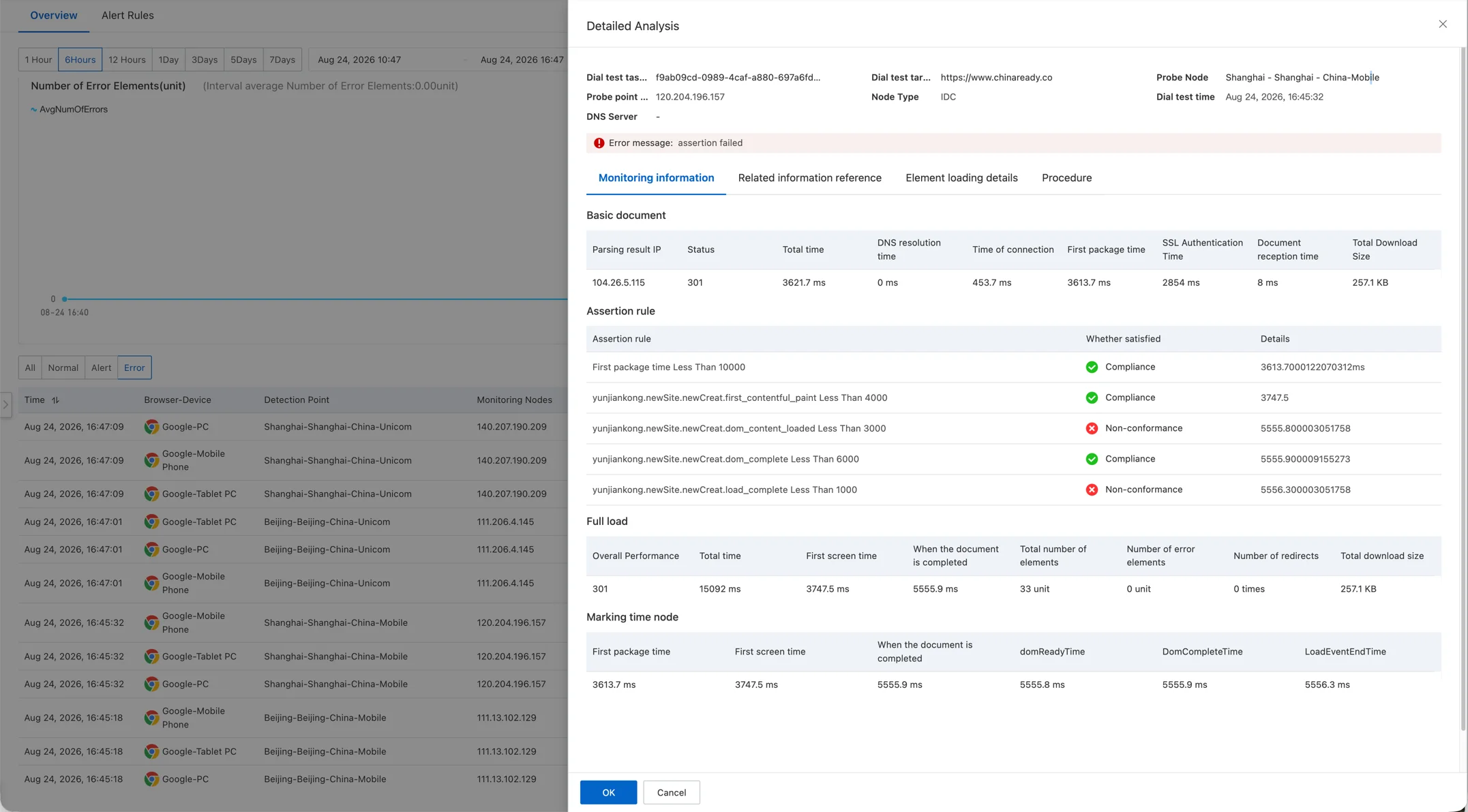
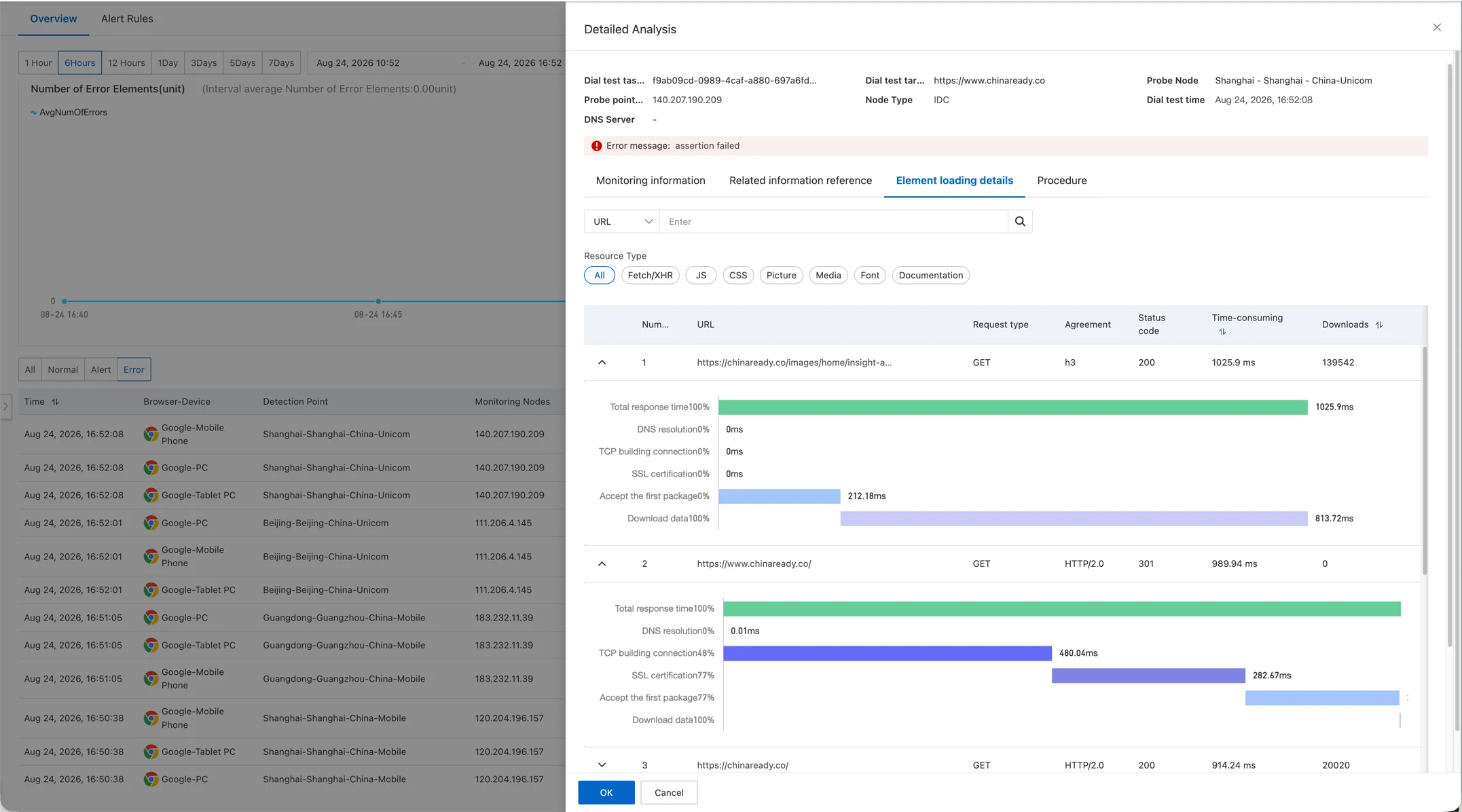
A sample export from a live detection: 140+ Mainland China nodes — city, carrier, resolved IP, status code, and per-phase timings (DNS, connect, SSL, first byte, download) for one URL. The same data your team gets from every run.
What it answers
Built for the questions your overseas monitoring cannot answer.
-
Is our service actually reachable?
Availability of your offshore website, API, or backend as experienced by China users — not by your US dashboard.
-
How slow is it, really?
Latency baselines and trends from Mainland China nodes, so performance regressions surface before complaints do.
-
Did the last release break China?
Continuous checks catch new dependencies and asset changes that silently degrade the China experience.
-
Where is the page actually stuck?
Full page fetch splits one load into DNS, TCP, TLS, first byte, and download — per node and per element — so the slow segment is named, not guessed.
-
Which request is dragging the load?
The element waterfall ranks every script, style, image, and XHR by phase, protocol, and duration — and names the blocking request behind a page that crawls only in China.
-
Can we prove it with data?
Every run exports per-node results — city, carrier, resolved IP, status, and phase timings — ready to hand to your dev team or your vendor.
China firewall test
What a China firewall test can — and cannot — tell you.
Not every China-side failure is a block.
A China firewall test can determine whether your website is reachable from Mainland China. It cannot, by itself, tell you why it is not. Website accessibility in Mainland China depends on DNS resolution, network routing, origin connectivity, TLS configuration, and third-party resources, any of which can misbehave for China users while your overseas monitoring stays green.
That is why every check on this page splits a failure by phase and by node — which city, which carrier, which step. The pattern names the cause, and the cause picks the fix: dependency cleanup, acceleration, or China hosting with the right filing behind it.
Frequently asked questions
What is a China firewall test?
It is a check that loads your website from servers inside Mainland China, instead of from overseas. It answers three questions at once: is the site reachable from China, how fast does it respond, and what exactly breaks — DNS hijacking, a blocked third-party script, or plain cross-border latency. See how each check runs →
How do I check if my website is blocked in China?
Run HTTP and DNS checks from Mainland China nodes and compare against your overseas monitoring. A site that answers 200 everywhere except China-side nodes — or resolves to a different IP inside China — is blocked or interfered with. Read the step-by-step checklist →
Why is my website slow in China even though it is not blocked?
Reachable is not the same as fast. Cross-border transit, TLS handshakes over long distances, and unblocked-but-slow third-party scripts and fonts each add seconds. Full page fetch shows exactly which phase and which element eats the time, per node and per carrier. See why even China hosting can stay slow →
How is this different from a free China firewall tester?
Free testers typically fire one request from one or two cities and show a screenshot. This runs from 140+ nodes on Telecom, Mobile, and Unicom, breaks every load into phases and elements, exports the raw per-node data, and keeps tracking after launch as an SLA baseline.
Can I test website speed in China, not just availability?
Yes. Ping latency gives the network baseline; full page fetch adds first-screen, DOM-complete, and total-load timings, plus first-byte and download time for every element — the numbers you need to benchmark China-side performance release over release. See the workflow in the Client Workbench →
Why does my website work in Hong Kong but not in Mainland China?
Hong Kong and Mainland China are different networks. A route that terminates in Hong Kong never crosses the mainland border, so "works in Hong Kong" says nothing about accessibility inside it. Test from nodes that are physically and administratively inside Mainland China — on Telecom, Mobile, and Unicom — or you are measuring the wrong thing.
Can DNS problems make my website unavailable in China?
Yes. If China resolvers return no answer, a stale record, or a different IP, users never reach your origin even though the server itself is healthy. The DNS check shows what each carrier’s resolvers actually return for your domains, and how long they take.
Does my website need an ICP filing to be accessible in China?
Technical accessibility and regulatory compliance are separate questions. A site can be reachable from Mainland China and still need a filing depending on its hosting and business model — and lack of a filing is not why a page loads slowly. Diagnostics settles the technical question first; the filing question follows. Read the ICP and PSB filing guide →
How can I improve my website performance in China?
Start from evidence: which phase and which element eat the time. Common wins are replacing blocked or slow third-party scripts and fonts, tightening TLS and redirect chains, and moving origin or edge assets closer to mainland users — the fix follows the failure class, not a default rebuild. See how AWS China architecture fits in →
How to get access
Enabled per contract in the Client Workbench.
Network Diagnostics is a paid Workbench module. Chinaready turns it on for your organization when your contract includes it.
- In Workbench
Entitled organizations
Signed clients with the diagnostics entitlement run HTTP, PING, and DNS checks — plus full page fetch — from the Client Workbench Tools console.
Open Client Workbench - By contract
Need it turned on?
If your organization does not see the module yet, ask your Chinaready advisor to enable Network Diagnostics under your contract.
Contact Us
Free assessment
Apply for a free China key-page assessment.
No Workbench entitlement needed — one message is enough to start.
Send us up to 10 URLs that matter most to your China launch — the homepage, signup, checkout, and the APIs your product calls. Our team runs them through Mainland China nodes and sends back a written assessment: what is reachable, which phase eats the time, which dependencies break, and what to fix first.
-
Send your URLs
Use the Contact Us button right below this section and list up to 10 URLs in the message, with a line of context — what users report, what worries you.
-
We test from inside China
HTTP, DNS, and full-page fetch across cities and carriers — the same checks the Workbench runs, executed by our team.
-
Read the report
A plain-language assessment with the evidence attached and a recommended next step — free, no commitment attached.
The Contact Us button is waiting right below — send your URLs there.

Is your website ready for China?
Test your current website from Mainland China before you change infrastructure or commit to a China delivery strategy.